
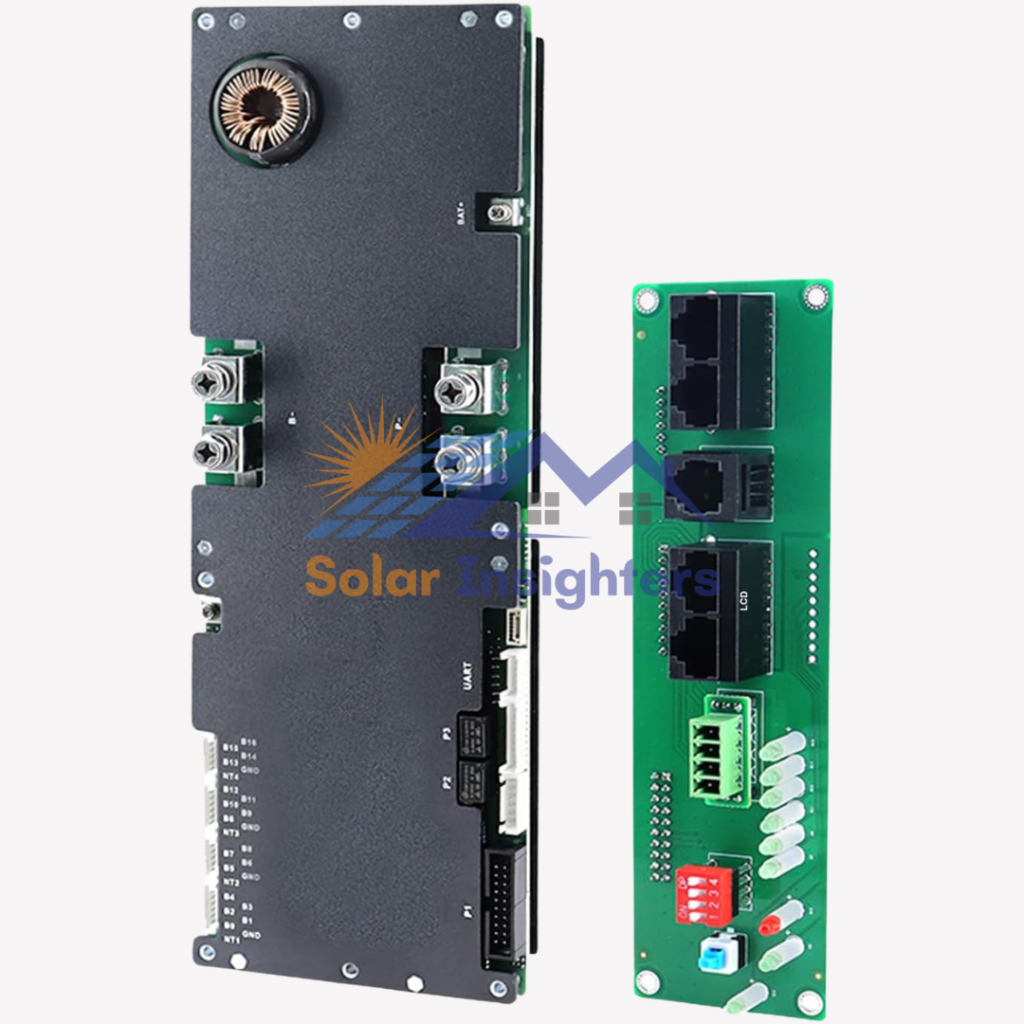
Home Energy Storage Inverter BMS with UART Port
| Brand | JKBMS |
| Recommended Uses For Product | Home solar energy storage, backup power supply, communication base station battery management, inverter-connected battery pack, |
| Power Source | Solar and Battery Powered |
| Wattage | 1100 Milliwatts |
| Battery Capacity | 960 Amp Hours |
About this item
Home Energy Storage Inverter BMS with UART Port
A Home Energy Storage Inverter BMS (Battery Management System) with UART Port is a critical component in solar and battery storage systems. It manages battery performance, health, charge/discharge safety, and communication between the battery pack and the inverter or controller — all while providing real‑time status data via a UART communication port.
Whether you’re building a DIY solar battery, upgrading a home energy system, or integrating batteries with an inverter, this BMS ensures safe, efficient, and intelligent battery operation.
Key Features
🔋 Battery Protection & Management
The BMS monitors and manages:
- Overcharge protection
- Over‑discharge protection
- Overcurrent & short‑circuit protection
- Temperature monitoring
This keeps your battery safe and prolongs lifespan.
🧠 Cell Balancing
Ensures all battery cells remain balanced by equalizing voltage among them, preventing early cell failure.
📊 UART Communication Port
The UART (Universal Asynchronous Receiver/Transmitter) interface allows the BMS to send real‑time data to:
- Solar inverter
- Charge controller
- PLC controllers
- Displays or monitoring systems
This is critical in smart home energy storage systems for monitoring and control.
🔌 Integration with Inverters & Controllers
Many inverters and solar controllers support UART data input, allowing them to read:
- State of Charge (SOC)
- Battery voltage & current
- Cell temperatures
- Error or fault codes
🌡 Temperature Sensors Support
BMS units often include temperature sensor inputs to prevent battery overheating or freezing conditions.
⚡ High Current Capability
Designed to handle high current flows typical in home energy storage, matching battery banks from 48 V up to higher volt systems.
📈 Fault Alerts & Logging
Generates alerts for:
- Over‑temperature
- Cell imbalance
- Communication errors
- Over / under‑voltage
This makes troubleshooting and maintenance easier.
How It Works
- Connect battery cells to the BMS (series/parallel configuration depending on system).
- Wire the BMS to the inverter’s communication port (UART) and power supply.
- The BMS monitors voltage/current/temperature in real time.
- If any parameter goes out of safe range, the BMS protects the battery by limiting charge/discharge or shutting down.
- The UART port sends data to the inverter or monitoring system for real‑time display and logging.
This keeps your energy storage system safe, smart, and efficient.
Pros and Cons
| Pros (Advantages) | Cons (Disadvantages) |
|---|---|
| Protects battery from damage | Requires careful installation |
| Cell balancing extends battery life | UART setup requires compatible inverter |
| Real‑time monitoring & data | May need configuration software |
| Enhances safety and reliability | Can be complex for first‑time builders |
| Supports temperature sensor inputs | May require soldering/wiring skills |
| Improves inverter communication | Not universal — compatibility varies |
Best Uses
A Home Energy Storage Inverter BMS with UART Port is ideal for:
✔ Solar energy storage systems
✔ DIY battery banks (LiFePO4, Li‑ion)
✔ Off‑grid home power systems
✔ Inverter battery integration
✔ Smart home energy monitoring systems
✔ Backup power solutions
This BMS is especially useful where you need battery data relayed to the inverter or monitoring device for intelligent energy management.
Why UART Port Matters
Without a UART or similar communication interface, many inverters and controllers can only see basic voltage/current input, limiting their ability to monitor battery health. With UART communication, you get:
📌 Accurate State of Charge (SOC) reading
📌 Real‑time battery health metrics
📌 Fault alerts and logs
📌 Temperature and cell balance data
📌 Better integration with smart controllers
This enables efficient charging algorithms, better battery protection, and smarter energy management.
Installation Overview
⚠️ Note: BMS installation requires experience with batteries and electrical wiring. If unsure, consult a professional.
- Mount the BMS board in an insulated, ventilated area near the battery pack.
- Connect BMS to battery cells according to the voltage configuration.
- Attach temperature sensors if supported.
- Wire UART communication from the BMS to the inverter/controller UART input.
- Verify connections and power up the system.
- Use compatible monitoring software or display to view data and adjust settings.